humsong No. 317 · 13.11.2026
Hum a song.
See its notes.
Press Hum and hum the bit that’s stuck in your head. Your browser writes it down as notes and a melody code you can search with. Nothing leaves this tab.
Notes heard
- Notes appear here
- Parsons code
- *
- Intervals (semitones)
- —
No mic? Tap it out
01
Where to take your hum
Free ways to put a name to a tune, from hottest to coldest for humming. We don’t run a song database, so these are the places that do. Checked November 2026.
-
Hum?Yes
Google app (Android, iPhone), Google Search widget, Circle to Search on Android
Tap the mic, choose “Search a song”, then hum, whistle or sing for 10–15 seconds.
-
YouTube MusicFreeHum?Yes
YouTube Music app (Android, iPhone)
Search, tap the waveform/song-search icon, then hum or sing.
-
SoundHoundFree, with adsHum?Yes
SoundHound app (Android, iPhone). Its old website midomi.com now points to the app.
Tap the orange button and hum or sing the part you remember.
-
MusipediaFreeHum?Use our notes
Website, any browser
Paste the Parsons code this page gives you (like *UDRU) into its Melodic Contour search.
-
WatZatSongFreeHum?People listen
Website, any browser
Post a recording of your hum or the notes, and the community guesses the song.
-
Hum?People listen
Reddit
Post a short hum recording (Vocaroo works) or share the link from this page with what you remember.
-
ShazamFreeHum?No
iPhone, Android, Mac, Chrome
Only matches the original recording. Use it when the song is actually playing, not to hum.
02
Melody of the day
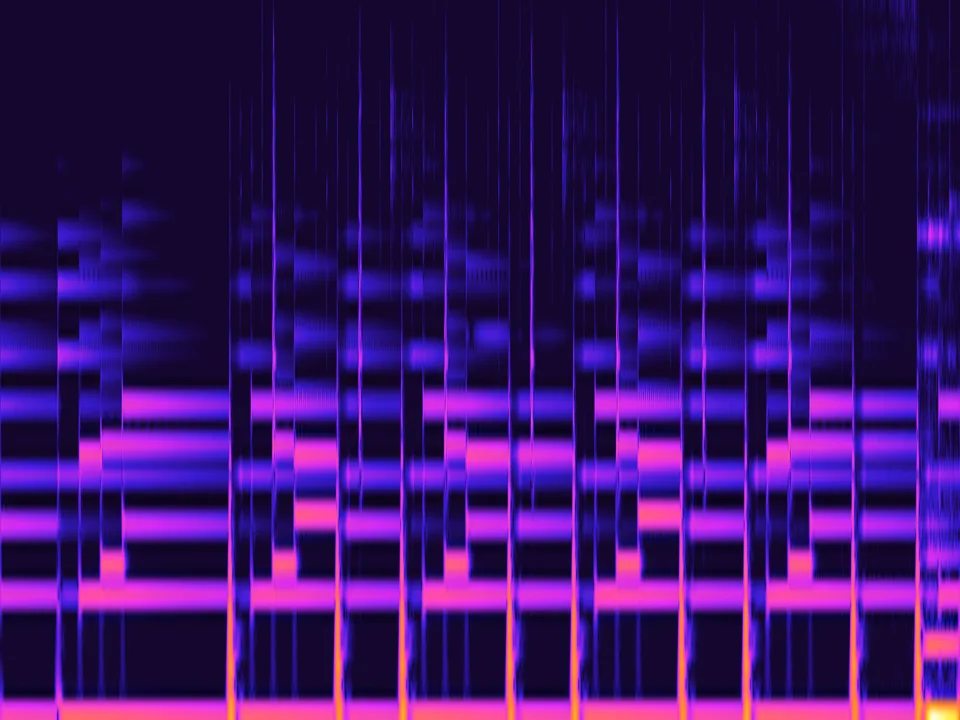
Every day a different 20-second stretch of a Purrple Cat track. Play it, watch its notes glow on the heat map up top, then hum it back and compare.

InsomniaPurrple Cat · City Nights 3, 2026
Clip starts at 0:10. On the poster, time runs bottom to top and high notes sit on the left; bright stripes are held notes.
- Press Play 20 s and listen to the hook.
- Press Hum at the top and hum it back.
- Compare your notes with the stripes on the heat map.
Full album on Spotifypurrplecat.com
Use it in your videos with this credit:Music by Purrple Cat (purrplecat.com), licensed under CC BY 4.0: creativecommons.org/licenses/by/4.0/
The last six days
03
Hum so a machine can hear you
- 01
Hum on “da” or “la”
A closed-mouth mmm is soft and buzzy. A clear syllable gives every note a start, so the notes split cleanly.
- 02
Pick the catchiest 5–10 s
Usually the chorus or the hook you can’t shake. Searches need the melody, not the whole song.
- 03
Hold each note a moment
Notes shorter than about 0.1 s get skipped. A steady, slightly slow hum reads best.
- 04
Get close, keep it quiet
Hum 10–20 cm from the mic with the TV and music off. Background songs confuse every hum search.
- 05
Key doesn’t matter
Hum wherever it’s comfortable. The Parsons code and the intervals are the same in any key.
- 06
Try two tools
Google and SoundHound match against different melody data, so a miss on one can be a hit on the other.
04
Questions
Can I find a song by humming it for free?
Yes. Google hum to search (in the Google app and Circle to Search), YouTube Music and the SoundHound app all accept humming and cost nothing. This page also turns your hum into note names and a Parsons code you can paste into Musipedia or share with people who might know the tune.
Does Shazam work with humming?
No. Shazam matches the original recording, so humming, singing or a cover usually returns nothing. Use it when the song is actually playing nearby.
Does humsong.com identify songs by itself?
No. It listens to your hum in your browser and writes down the notes you hummed: note names, the up/down Parsons code and the intervals. It doesn’t search a song database. Use the free tools in the list for that.
Is my humming recorded or uploaded?
No. The microphone sound is analysed inside your browser tab and is never sent anywhere. Share links only contain the note numbers and lengths, like 3c4.3e4.
What is a Parsons code?
A way to write a melody as just its shape: * for the first note, then U (up), D (down) or R (repeat) for each next note. Twinkle Twinkle starts *RURURD. It works even if you hum in the wrong key.
Can I use the Melody of the day in my videos?
Yes, Purrple Cat music is CC BY 4.0, so you can use it in new songs and videos on Spotify and YouTube with the credit line. Don’t re-upload the original beats as they are, and don’t release remixes, covers or raps over the beats on streaming platforms.
Who is Purrple Cat?
A lofi project with 500+ songs and 500M+ streams. Every Melody of the day here is a real Purrple Cat track, played straight from the official files.